



Most WordPress sites do not break because of one dramatic event. They break because a plugin update was skipped for six months, a backup was never tested, or nobody noticed that the contact form stopped sending mail three weeks ago. WordPress maintenance plans exist to remove that quiet, slow risk. At BeeDynamic Group we maintain WordPress sites for clients in Switzerland, the DACH region, Kosovo and Albania, so this comparison comes from daily practice.
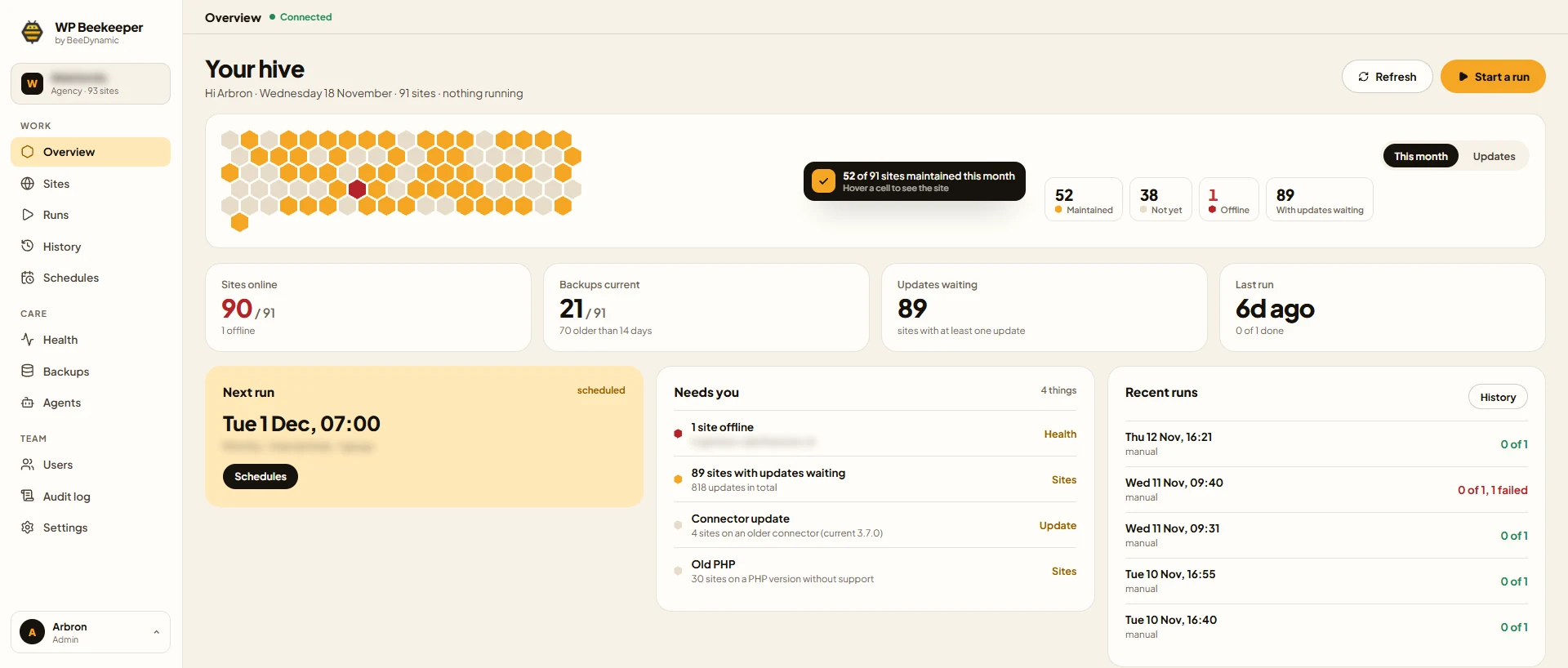
The WP Beekeeper overview: every site, its last backup, last update and current status in one view. Client names are blurred.
The problem is that the market is confusing. Some WordPress maintenance plans are dashboards you operate yourself for a couple of dollars per site. Others are human-run services at $89 to $359 per site per month. In between sit hosting add-ons, freelancer retainers and automated care services. They all use the same words (“updates”, “backups”, “monitoring”) and mean very different things.
This guide compares them properly. We cover what a good plan includes, what each approach costs, and how the main tools stack up: ManageWP, MainWP, WP Umbrella, InfiniteWP, WP Buffs and our own product, WP Beekeeper. Prices were checked on the official pricing pages in November 2026.
Disclosure. WP Beekeeper is built by BeeDynamic Group, the agency that publishes this blog, so we are not a neutral party. We built it for the client sites of our own agency first. To keep this fair, every competitor figure below comes from that vendor’s own pricing page, we say where a competitor is the better choice, and we flag where our product costs more. Prices change often, so click through to the official pages before you decide.
Key takeaways
- A real maintenance plan does five things: backs up first, updates safely, checks that the site still works, watches it between updates, and tells you what happened.
- Tools such as ManageWP, MainWP and WP Umbrella are cheap per site, but you operate them. Services such as WP Buffs and WP Beekeeper do the work for you, at a higher price.
- Host backups alone are not maintenance. They restore data; they do not update, verify or report.
- The cheapest option is rarely the lowest total cost once you count your own hours. DIY maintenance typically takes 40 to 85 minutes per site per month.
- Choose based on who will actually do the work every month, not on the lowest sticker price.
What a WordPress maintenance plan actually is
A WordPress maintenance plan is a recurring arrangement, paid monthly or yearly, that keeps your site updated, backed up, monitored and recoverable. The word “plan” matters. It means someone is accountable for a repeatable routine, not that you did a round of updates once when you remembered.
You will see the same idea sold under several names: WordPress care plan, WordPress maintenance package, WordPress website maintenance, WordPress site maintenance, managed WordPress maintenance or WordPress monthly maintenance. The labels are marketing. What matters is what sits behind them.
The simplest way to evaluate any offer is to separate three layers:
- Automation. Software that runs backups, updates and uptime checks on a schedule.
- Verification. Something that confirms, after each update, that the site still looks and works as before.
- Accountability. A person or a clear process that acts when something goes wrong and reports what happened.
Cheap tools usually give you layer one and leave layers two and three to you. Premium services add all three. The right choice depends on how much of layers two and three you are willing to own.
What a good WordPress maintenance plan includes
Whichever provider you choose, use this checklist. If a plan skips an item, you either handle it yourself or you accept the risk.
1. Backups that live off the server
A backup stored on the same server as your site is not a backup. If the server fails, is compromised or is deleted, both disappear together. A good plan keeps copies in separate storage, takes a fresh one before every update, and lets you restore with one click rather than a support ticket.
2. Safe, ordered updates
WordPress core, plugins and themes all need updates. The safe way is to update one component at a time, so that when something breaks you know which update did it. Bulk “update everything” buttons save time and make problems harder to trace. Good plans also define what happens when an update fails: roll back, then flag it.
3. A check after the update
This is the layer most budget plans skip. A site can return HTTP 200 and still be visually broken: a missing menu, a collapsed layout, a checkout button that vanished. Visual comparison, with before and after screenshots of key pages, catches problems that a ping never will.
4. Uptime monitoring from outside your server
Monitoring has to run outside your website. A check every five minutes means an outage is noticed in minutes, not when a customer emails. Look for the check interval, what is checked (homepage only, or login and admin as well) and how alerts reach you.
5. SSL, domain and email health
Expired certificates and broken email authentication (SPF, DKIM, DMARC) cause some of the most embarrassing failures: browser warnings, or invoices landing in spam. A plan should warn you before a certificate expires and watch your mail-related DNS records.
6. Security basics
Vulnerability monitoring, hardening and malware cleanup vary widely between providers. Be clear about which of these your plan covers. Many plans cover monitoring and prompt updates but treat malware removal as separate work. If your site is already compromised, our guide on what to do when WordPress is hacked explains the first steps.
7. A report you can actually read
Agencies need a client-ready report. Business owners need proof that the money is doing something. A plain-language monthly PDF showing what was updated, what was checked and what was flagged is a good test of whether a provider is organised.
8. Human support when something breaks
Automation handles the routine case. The exception, such as a plugin conflict or a theme that fatal-errors after an update, needs a person. Check response times and whether fixes are included or billed hourly. If you ever see a white screen, our critical error guide and our 500 error guide cover the common causes.
For a printable version of this list, see our WordPress maintenance checklist.
Why skipping maintenance gets expensive
WordPress powers a very large share of the web, which makes it the default target for automated attacks. Attackers do not choose your site; scripts scan for known vulnerable plugin versions across millions of sites. An outdated plugin with a published vulnerability is, in practice, an open door with a sign on it.
Security is only one cost. The others are quieter:
- Silent breakage. A PHP version change, a plugin conflict or an expired certificate can degrade a site for weeks before anyone notices.
- Lost leads. A broken form or a slow checkout loses revenue without producing an error message anyone sees.
- Emergency pricing. Fixing a hacked or crashed site at 9 pm on a Friday costs far more than a monthly plan. Developers charge a premium for urgent work, and downtime has its own cost.
- Technical debt. A site that has not been updated for a year is much harder to update than one maintained monthly. Jumping several major versions at once is where things break. If you inherit a neglected site, see our guide to taking over a WordPress website.
The argument for a plan is not fear. It is arithmetic. A routine that costs minutes per month is cheaper than an emergency that costs days.
Five ways to maintain a WordPress site
Almost every option falls into one of five approaches. Each is right for someone.
1. Do it yourself
You log in, take a backup, update plugins, click through your pages and fix what broke. It costs no subscription fee, and you control everything. The cost is your time. Our cost calculator uses these per-site monthly benchmarks: backup 5 to 10 minutes, updates 10 to 20, checking pages 15 to 30, monitoring and small fixes 5 to 15, and a report 5 to 10. That is 40 to 85 minutes per site per month. For one site you care about, that can be fine. For ten sites, it is a part-time job. You can estimate your own figure with the maintenance cost calculator.
2. A freelancer or small agency retainer
A person who knows your site, answers email and fixes odd problems. Quality ranges from excellent to nonexistent. Pricing varies hugely; we see roughly $60 to $150 per site per month for typical retainers, which is a market estimate, not a quote. The risk is single-person dependency: when your freelancer is ill or busy, nobody is covering.
3. Hosting backups and managed hosting
Many hosts include daily backups and some automatic updates. This is useful and you should keep it. It is also incomplete. Host backups restore data; they do not verify that a plugin update left your layout intact, and they rarely produce a report. We explain the gap in detail on our WP Beekeeper vs hosting backups page.
4. A multi-site management tool
Tools such as ManageWP, MainWP, WP Umbrella and InfiniteWP connect many sites to one dashboard so you can update, back up and monitor them in bulk. They are efficient and cheap per site. They assume someone logs in and acts on what the dashboard shows. If that someone is you, the tool saves hours. If nobody logs in, the dashboard is only as good as the alerts you actually read.
5. A done-for-you maintenance service
A provider runs the routine for you, checks the result and reports. This ranges from automated care services, such as WP Beekeeper’s Care plan, to human-run services such as WP Buffs. You pay more per site and spend almost no time yourself.
| Approach | Who does the work | Typical cost per site / month | Best for |
|---|---|---|---|
| DIY | You | $0 plus 40 to 85 min of your time | One or two simple sites, technical owners |
| Freelancer retainer | One person | About $60 to $150 (market estimate) | Sites needing custom work and a personal contact |
| Hosting backups only | Host (data only) | Included or small add-on | A baseline, not a full plan |
| Management tool | You or your team, with software | About $2 to $9 (tool dependent) | Agencies with in-house WordPress skills |
| Done-for-you service | Provider | €29 to $359 depending on depth | Owners and agencies who want it handled |
What WordPress maintenance costs in 2026
WordPress maintenance cost depends almost entirely on one question: who does the work? Software-only tools sit at the bottom. Human-run services sit at the top. Pantheon’s guide to maintenance plans cites a market range of $30 to $5,000 or more per month, which reflects everything from a basic brochure site to an enterprise build with SLAs.
For a typical small business site, realistic monthly figures per site look like this:
- Tool-only: roughly $2 to $9 per site, plus your own time.
- Automated care service: roughly €29 to €49 per site, including verification and reporting.
- Human-run service: roughly $89 to $359 per site, scaling with what is included (edits, speed work, security cleanup).
- Freelancer: a wide band, commonly $60 to $150.
Two extra points matter when you compare quotes. First, check what is excluded. For example, WooCommerce updates, premium plugins without a valid license, and PHP version changes are handled separately by some providers. Second, check the setup fee. WP Beekeeper charges a one-off €29 per site, free on yearly billing; other providers have their own onboarding terms.
The main WordPress maintenance tools and services compared
Below is each option, with its official pricing as of November 2026, what it does well and who it suits. We link each vendor’s pricing page so you can confirm current numbers.
ManageWP
Model: cloud dashboard, free core plus paid per-site add-ons. Official pricing.
ManageWP’s core dashboard is free for unlimited sites. It includes a monthly cloud backup, security check, performance check, client reports, Google Analytics integration, maintenance mode, one-click login and update management, plus team collaboration. Paid add-ons are priced per site per month: Backups $2, Uptime Monitor $1, Automated Security Check $1, Automated Performance Check $1, Advanced Client Reports $1, White Label $1, SEO Ranking $1, Vulnerability Protection $2 and Link Monitor $1. If you stack all add-ons you reach roughly $9 per site per month, and a combined bundle caps at $150 per month for up to 100 sites. Billing is usage-based at month end, with no contracts. Clone and migrate and Safe Updates require the premium backup add-on.
Strengths: the free tier is generous, the interface is mature, and add-ons let you pay only for what you need.
Trade-offs: you operate it. Safe Updates and backups cost extra, and a full stack adds up. There is no formal trial, and PayPal is not supported.
Best for: freelancers and agencies comfortable running a dashboard. See our WP Beekeeper vs ManageWP comparison for a deeper look, and treat it as the place to start if you are searching for a ManageWP alternative.
MainWP
Model: self-hosted dashboard on your own WordPress install. Official pricing.
MainWP Core is free and covers updates, backups and uptime monitoring, but it leaves out Client Reports, Team Permissions and White Labeling, and support is through the community. MainWP Pro is listed at $29 per month, or $149 per year (the page showed a regular price of $199 per year with a promotional coupon), or $599 lifetime. Pro includes unlimited sites, 35+ add-ons, priority ticket support and a 30-day money-back guarantee. Because it is self-hosted, your data stays on your server.
Strengths: excellent value at scale, since the price does not rise per site. Strong control and data ownership.
Trade-offs: you host and maintain the dashboard itself, which is another WordPress install to keep secure and fast. It suits technical teams.
Best for: agencies with in-house developers managing many sites. Read our WP Beekeeper vs MainWP page if you are weighing a self-hosted route.
WP Umbrella
Model: cloud platform, one plan, flat per-site price. Official pricing.
WP Umbrella lists €1.99 per site per month. Examples from its page: 10 sites at €19.90, 50 sites at €99.50, 100 sites at €199, with 10% off for yearly prepayment. The plan includes encrypted incremental backups kept for 50 days on EU infrastructure, bulk safe updates with rollback, uptime monitoring, PageSpeed monitoring, white-label reports, a security layer (vulnerability checks every six hours via Patchstack, hardening, 2FA and a security score), domain and SSL monitoring, PHP error monitoring, unlimited team members and human support. Add-ons include Security at €2 per site, Hourly Backups at €2.49 and security audits from €30 one-off. There is a 14-day trial with no card.
Strengths: very good price for what is bundled, clean single-plan pricing, strong monitoring depth.
Trade-offs: still a dashboard you run. Its strengths lie in monitoring and safe bulk updates, not in someone checking each page for you.
Best for: agencies and freelancers who want one affordable platform for many sites. If you want to see how the two differ in practice, we wrote WP Beekeeper vs WP Umbrella.
InfiniteWP
Model: self-hosted admin panel with paid annual licences. Official pricing.
InfiniteWP’s base panel is free. Annual licences listed on the page are Enterprise unlimited sites at $647 per year, Agency unlimited at $447, Freelancer for 50 sites at $347, Developer for 20 sites at $247 and Starter for 10 sites at $147. A promotional set for new customers shows up to 30% off. The page is ambiguous about which price set is current, so confirm before buying, and a 14-day refund applies.
Strengths: one-time annual cost rather than per-site monthly billing, long track record, and your own hosting.
Trade-offs: the interface and workflow feel older than newer cloud tools, and like MainWP you run the panel yourself. Pricing pages can be hard to read. Our WP Beekeeper vs InfiniteWP page goes into the differences.
Best for: developers who prefer owning their stack and paying yearly.
WP Buffs
Model: human-run, white-label care service, one site per plan. Official pricing.
WP Buffs lists four tiers. Maintain is $89 per site per month with weekly updates, 24/7 emergency support and uptime monitoring, Google Analytics integration and cloud backups four times daily. Protect is $179 and adds unlimited edits and security optimisation. Perform is $239 and adds speed optimisation, e-commerce plugin management, mobile and image optimisation and malware removal. Custom is $359 and adds safe updates on staging, custom functionality monitoring and support for Pantheon, AWS and VPS hosting. Support is email only and onboarding takes 24 to 48 hours. White label is available. Confirm current terms on the official page.
Strengths: real people, emergency coverage, content edits and deep technical support at higher tiers.
Trade-offs: the highest cost per site in this comparison, and each site needs its own plan. For ten sites, Maintain alone is $890 per month.
Best for: businesses and agencies that want hands-on human support and have the budget. Our WP Beekeeper vs WP Buffs page compares the two approaches.
WP Beekeeper
Model: automated care service with visual verification and a monthly report. Official pricing.
WP Beekeeper is built around one routine: back up, update, check, decide, report. Before updates, it takes a full off-server backup. It then updates plugins, themes and core one by one and verifies each. After the update, it compares before and after screenshots of your pages (about 14 pages per site on average) and flags differences, with the backup ready if you decide to restore. At the end of the month you get a plain-language PDF report. Uptime is checked every five minutes, and each site has three checks: homepage, wp-admin and SSL.
The Care plan is €29 per site per month. It includes a full backup before every update, monthly updates, before and after visual checks, one-click restore, uptime, SSL, email and DNS monitoring, and the monthly PDF report. Care+ is €49 and adds human checks and fixes, 30 minutes of expert support per month and a reply within one working day; extra support is €70 per hour. Volume pricing starts from €25 (Care) and €45 (Care+) for 11 to 50 sites, and from €19 and €39 for 51 to 100 sites. The Agency tier for 100+ sites adds white-label reports, a multi-site overview and partner billing. Yearly billing gives two months free, and pricing can be set in EUR, CHF or USD. A 14-day free trial needs no credit card.
Strengths: the visual check, which most tools and plans lack. Reports that clients and owners can read. Almost no time required from you.
Trade-offs: it costs more per site than tool-only options like WP Umbrella or ManageWP, because you are paying for verification and reporting, not just a dashboard. It does not include WooCommerce updates, premium plugins without a valid license, or PHP version changes, which are handled as one-off work. See WooCommerce maintenance if you run a shop.
Best for: small business owners who want maintenance handled, and agencies who want a client-facing monthly report without building one by hand. Details are on the small business and agency pages.
Side-by-side comparison table
This table condenses the facts above. Figures come from official pages checked in November 2026 and may have changed.
| Provider | Type | Entry price | Backups | Visual check after updates | Uptime | Reports | Human support |
|---|---|---|---|---|---|---|---|
| ManageWP | Cloud tool | Free core; add-ons $1 to $2 per site | Monthly free; paid add-on for more | Safe Updates (premium backup required) | Add-on, $1 | Free basic; advanced $1 | Standard support |
| MainWP | Self-hosted tool | Free Core; Pro $29 per month | Yes | No | Yes | Pro only | Community; priority on Pro |
| WP Umbrella | Cloud tool | €1.99 per site | Incremental, 50 days, EU | No (safe updates with rollback) | Yes | White-label | Included |
| InfiniteWP | Self-hosted tool | From $147 per year (10 sites) | Yes | No | Per plan | Per plan | Licence support |
| WP Buffs | Human service | $89 per site | 4 times daily | Staging on top tier | 24/7 | Yes | Email, emergency 24/7 |
| WP Beekeeper | Automated care service | €29 per site | Before every update, off-server | Yes, screenshot comparison | Every 5 min | Monthly PDF | Care+ €49 adds 30 min expert time |
Read across the “Visual check” column and one thing stands out. Most tools protect you with backups and rollback; far fewer confirm that your pages still look right. That is the gap our product was built to close, and it is also the reason we cost more than a pure dashboard.
Cost scenarios: 1, 10 and 50 sites
Sticker prices are misleading until you multiply them. These scenarios use list prices from the official pages, excluding VAT and promotions, and rounded. They are simple illustrations, not quotes. For tool-based options, add your own hours.
| Option | 1 site | 10 sites | 50 sites |
|---|---|---|---|
| WP Umbrella | ~€2 | €19.90 | €99.50 |
| MainWP Pro | $29 | $29 | $29 |
| InfiniteWP (annual licence, per month) | ~$12 (Starter, 10 sites) | ~$12 | ~$29 (Freelancer, 50 sites) |
| ManageWP, all add-ons (~$9) | ~$9 | ~$90 | ~$450 (bundle caps apply near 100 sites) |
| WP Beekeeper Care | €29 | €290 | About €1,250 at the €25 volume rate |
| WP Buffs Maintain | $89 | $890 | $4,450 |
Two honest conclusions follow. At scale, self-service tools are dramatically cheaper than any done-for-you option, including ours. If you have the staff to operate a dashboard, a tool wins on price. But the table leaves out time. If operating a dashboard costs you one hour per site per month, then for ten sites that is ten hours, and at any reasonable hourly rate the gap narrows quickly or flips.
The question to ask is not “what is the cheapest per site?” It is “what does the whole routine cost me, including my own hours and the cost of the problem that nobody noticed?” Use the maintenance cost calculator to put your own numbers in.
How WP Beekeeper handles a monthly cycle
Since we have been describing “verification” in the abstract, here is what it looks like in practice. The monthly routine has five steps.
Back up
A full copy is taken and stored off the server, with up to three copies kept for one-click restore.
Update
Plugins, themes and core are updated one by one, and each update is verified before the next.
Check
Before and after screenshots of your pages are compared, so layout and content changes are caught visually.
Decide
Differences are flagged. The backup is ready, so a bad update can be reversed.
Report
You get a plain-language PDF listing what was done and what needs attention.
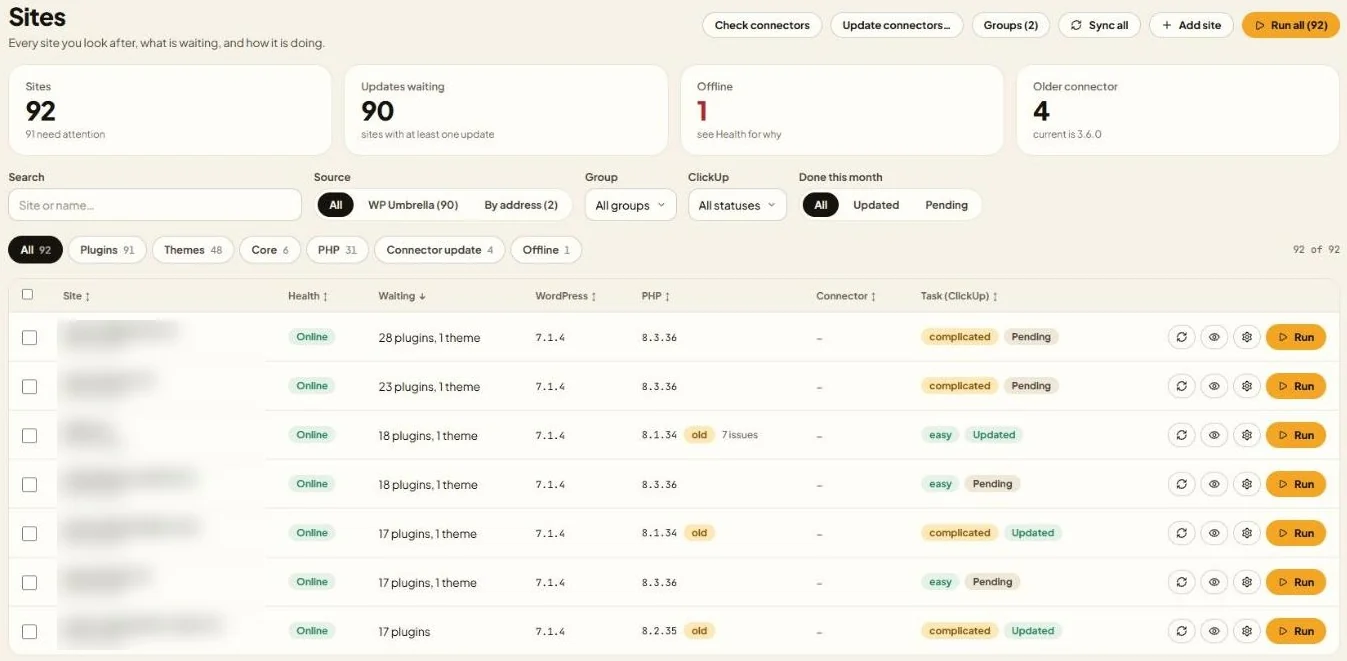
The Sites view lists every connected site with its current update and backup state.
Around that routine are the monitoring features: uptime checks every five minutes, SSL expiry warnings, and a weekly email and DNS health check covering SPF, DKIM, DMARC, MX and blacklist status. Alerts can go to a Microsoft Teams webhook or a phone push notification.
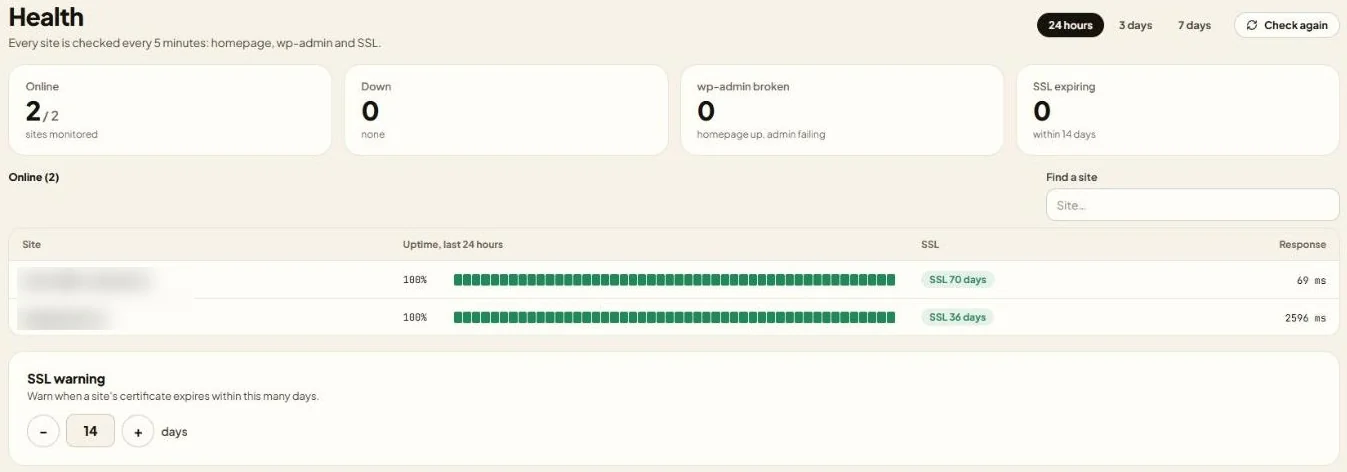
Health: uptime history per site. Some figures on our public demo pages are illustrative.
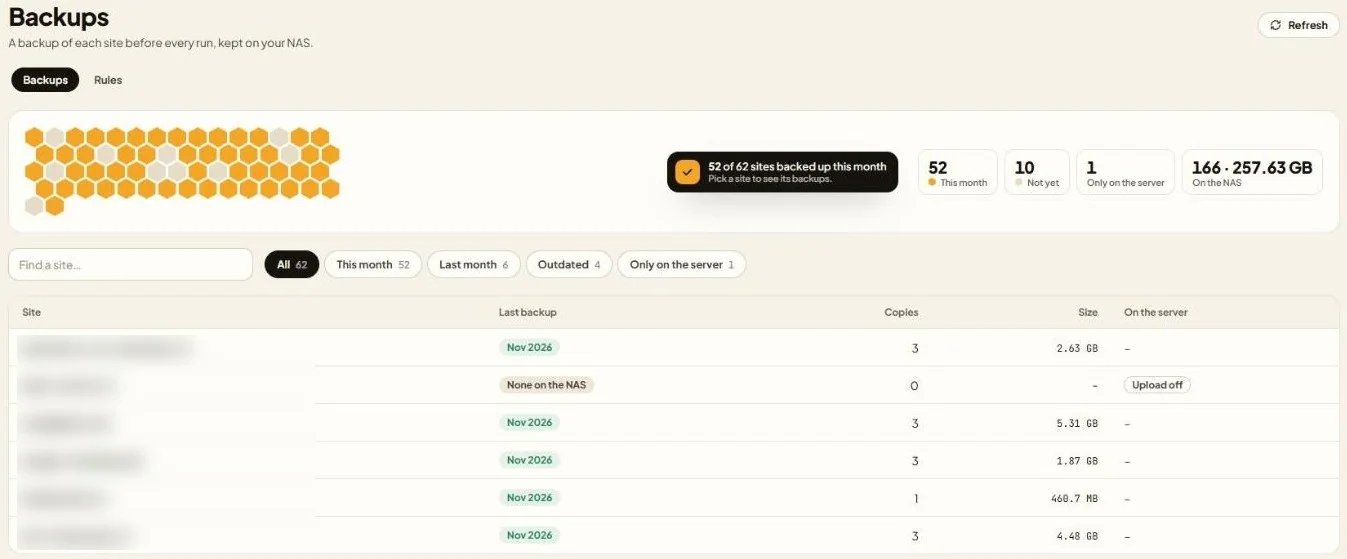
Backups are stored off-server, so a failing host does not take your restore points with it.
The dashboard also has a Schedules view, a Reports tab where client PDFs and CSV exports live, an Alerts area, and an Agents section in beta for tasks such as find-and-replace, broken link checks, image audits, alt text and SEO meta.
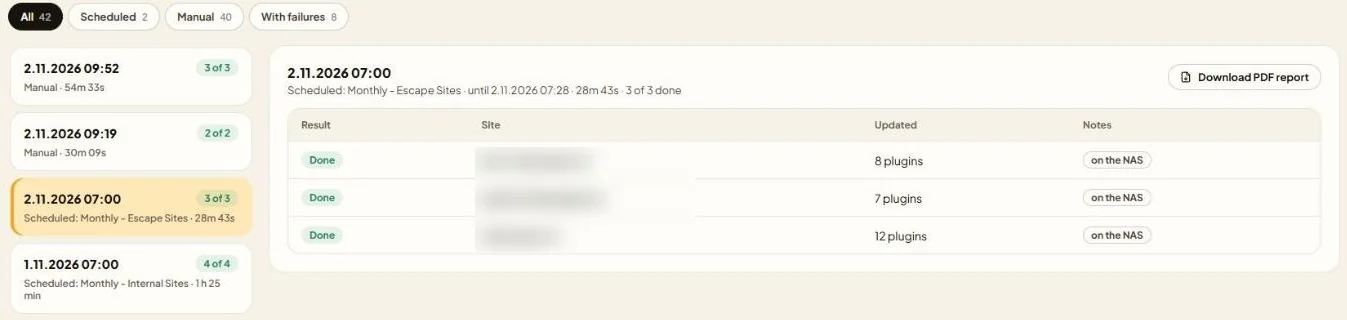
Reports: the monthly history that you or your clients can open as a PDF.
Security and access
We do not ask for admin passwords. The connection uses a small connector plugin, and backups are stored off-server in protected European storage. A data processing agreement is available on request. If you want the detail, see our security page. We are not affiliated with WordPress.org.
One-off services
Not every site needs a subscription. If you only need a specific job done, there are fixed-price one-off checks: Compliance Check €49, Security Audit €79, Speed Check €69, Accessibility Check €129, SEO Check €199, GEO Check €199, PHP upgrade €199 and a Fleet-wide update at €99. These suit sites you are evaluating before committing to a plan.
Want maintenance without setting it up yourself? 14 days free, no credit card, no passwords by email. Your first report arrives the next working day.
Start your free trial →How to choose: a decision guide
Use the following guide. Pick the first line that describes you.
- You manage 20+ sites and have in-house WordPress skills. Start with WP Umbrella, MainWP or ManageWP. They are the most cost-efficient. If you want a self-hosted setup, MainWP or InfiniteWP.
- You are an agency that wants client-ready reports without staff time. A done-for-you service such as WP Beekeeper, or a tool with white-label reporting such as WP Umbrella or ManageWP if you will build the process yourself. See the web designers page for how freelancers use it.
- You run a small business with one to five sites and nobody technical. Choose a service, not a tool. The routine and the report are what you are buying. The Care plan, or a freelancer you trust.
- You need emergency, 24/7 human support. WP Buffs, or WP Beekeeper Care+ if a one-working-day response is enough.
- You run WooCommerce. Check carefully what is included. Updates to shop plugins carry the highest risk, because a broken checkout loses revenue. Read our WooCommerce maintenance guide.
- You are on a tight budget with one simple site. A free tier plus discipline can work. Use ManageWP’s free core, or MainWP Core, and keep a monthly calendar reminder.
Ten questions to ask any provider
- Where are backups stored, and how many copies are kept?
- Is a backup taken before every update, automatically?
- Are updates applied one at a time or in bulk?
- What happens when an update breaks the site?
- Does anyone verify the site visually after updates?
- How often is uptime checked, and what exactly is checked?
- What is excluded (WooCommerce, premium plugins, PHP changes, malware)?
- How fast is support, and are fixes included or hourly?
- What does the report contain, and can I white-label it?
- Can I leave any month, and can I export my data and backups?
Red flags
- “Unlimited” anything with no definition of what is covered.
- Backups stored only on your own server.
- No statement of what happens when an update fails.
- Long contracts with no trial.
- A request for your admin password by email.
Switching providers safely
Changing providers is routine if you do it in order:
- Take a fresh full backup and store a copy yourself.
- Confirm you control hosting, domain registrar and WordPress admin access. Many problems come from access held by someone who has left.
- Connect the new provider while the old one is still active.
- Run the first update cycle with a visual check and compare it against the previous state.
- Cancel the old provider only after the first successful cycle and a restore test.
If you are also changing PHP versions, do that separately from the provider switch, never in the same step. Our guide on updating the PHP version of WordPress explains the order.
Frequently asked questions
How much do WordPress maintenance plans cost?
Tool-only plans run from a few dollars per site per month. Automated care services such as WP Beekeeper cost €29 to €49 per site, and human-run services start around $89 per site. Pantheon’s guide cites a total market range of $30 to $5,000 or more per month, depending on scope. What you get for the price, not the price alone, decides the value.
What should a WordPress maintenance plan include?
Off-server backups before every update, tested updates for plugins, themes and core, uptime monitoring, SSL and domain monitoring, a way to restore quickly, and a regular report. Visual checks after updates and human support separate basic plans from good ones.
Do I need a maintenance plan if my host already does backups?
Usually yes. Host backups protect against data loss, but they do not update plugins, verify that your pages still work afterwards, or alert you when something breaks. Backups stored on the same server also fail if that server fails.
Is ManageWP really free?
The core dashboard is free for unlimited sites, including a monthly cloud backup, security and performance checks, and client reports. Add-ons such as additional backups, uptime monitoring and vulnerability protection are paid per site per month. Check the official page for current prices.
What is the difference between a maintenance tool and a maintenance service?
A tool gives you a dashboard to run maintenance yourself. A service does the maintenance and reports back. Some products combine automation with a monthly report so you do not have to operate a dashboard.
How often should WordPress be updated?
Most plans update monthly, with faster handling of security releases. What matters most is that every update is preceded by a backup and followed by a check that the site still works.
What is white label WordPress maintenance?
It means an agency resells maintenance under its own brand. The provider does the work and issues reports carrying the agency’s logo. ManageWP, WP Umbrella, WP Buffs and WP Beekeeper’s Agency tier all offer some form of white-label reporting or service.
Can I switch maintenance providers without downtime?
Yes. Take a fresh backup, confirm you control hosting, domain and admin access, connect the new provider, and run one full update cycle with a visual check before cancelling the old one.
Let WP Beekeeper handle your updates.
Backup first, visual check after, a clear report every month. Try it free for 14 days.
Start free trial → See pricing Contact BeeDynamicSources
- ManageWP pricing
- MainWP pricing
- WP Umbrella pricing
- InfiniteWP pricing
- WP Buffs plans
- Pantheon: What WordPress maintenance plans actually include
All competitor prices were taken from the official pages in November 2026. Prices exclude VAT where stated by the vendor, are subject to change, and promotional prices may be temporary.